
Clutch
Follow this three-step process for integrating Clutch with Extole to automatically attribute, verify, and reward prospects and members when they open an account.
Prerequisites
| Requirement | Description |
|---|---|
| Google Tag Manager (GTM) | You must have a GTM account to use this integration. |
Step 1: Set up URL tracking parameters
To ensure prospects land on the correct page with the necessary tracking data, you'll need to make the following updates:
- Submit a request to your team at Clutch to push the
utm_contentparameter into your data layer. Map this parameter toadvocate_codein GTM. - In your Extole Flow Campaign, navigate to
Share Link Behavior - Set the
Destination for Clicks on Share Linksto your specific online account URL. - Append the advocate's referral code to your tracking parameters by updating the
utm_contentvariable with the following value:
{[ advocateCode ]}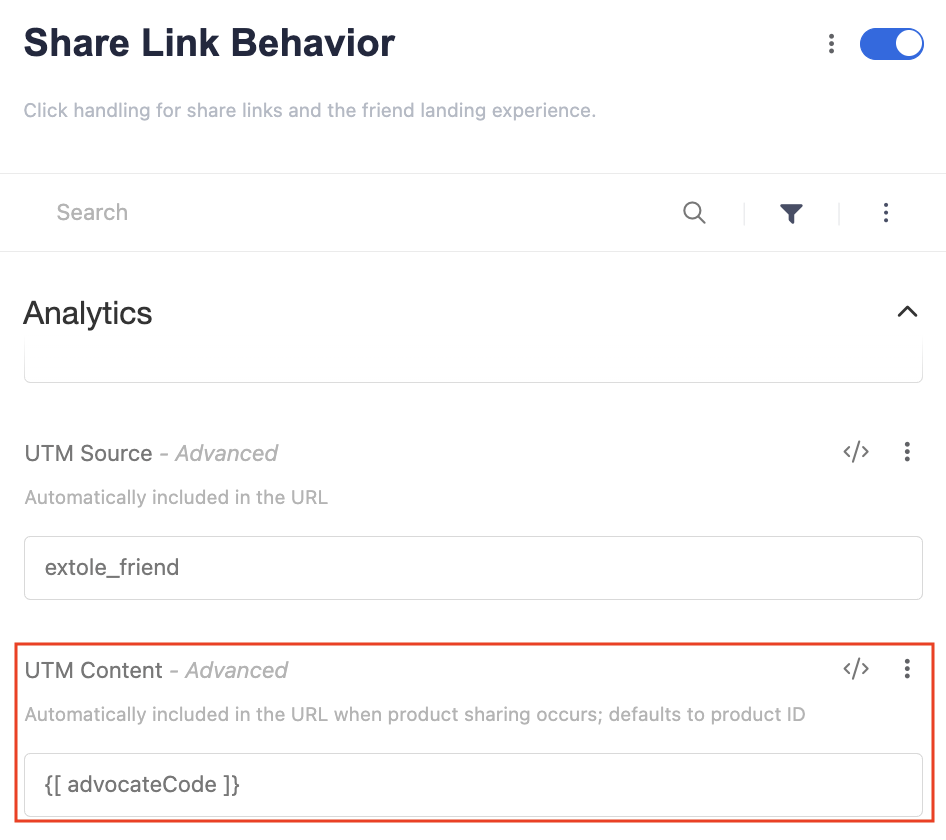
If you are already using the
utm_contentparameter, Extole can pass theadvocate_codeasutm_terminstead. Request this customization with your Extole team, then map to theutm_termparameter in your GTM.
Step 2: Tag your account opening flow
Use Google Tag Manager (GTM) to deploy Extole's core and event tags. Core tags are used for attribution and serving confirmation messages throughout the OAO flow. Event tags are used to enforce quality rules and track key conversion milestones throughout the account opening process.
Learn more about Extole's Javascript tags
Add the Extole core tag to all of your account opening pages
You can find your core tag in the Extole platform (Tech Center > Tag Generator.) It will look something like this:
<script type="text/javascript" src="https://share.{{your_company}}.org/core.js" async />Add tags to fire events
Fire Extole's application_startedtag on the first application page using Clutch's custom event trigger WC - Landing Page.
<script type="text/javascript">
    (function(c,b,f,k,a){c[b]=c[b]||{};for(c[b].q=c[b].q||[];a<k.length;)f(k[a++],c[b])})(window,"extole",function (c,b){b[c]=b[c]||function (){b.q.push([c,arguments])}},["createZone"],0);
    extole.createZone({
        name: "application_started",
        data: {
            "application_id": {{DAO - App ID}},
            "advocate_code": {{advocate_code}}
        }
    });
</script>
Fire Extole's application_submitted tag when the prospect/member completes their application using Clutch's custom event trigger WC - DAO - App Submission.
<script type="text/javascript">
    (function(c,b,f,k,a){c[b]=c[b]||{};for(c[b].q=c[b].q||[];a<k.length;)f(k[a++],c[b])})(window,"extole",function (c,b){b[c]=b[c]||function (){b.q.push([c,arguments])}},["createZone"],0);
    extole.createZone({
        name: "application_submitted",
        data: {
            "application_id": {{DAO - App ID}},
            "advocate_code": {{advocate_code}}
        }
    });
</script>
Step 3: Send account openings from Clutch to Extole via SFTP
Forward your daily export file from Clutch to Extole's SFTP server to notify Extole of account openings. Extole will extract and process the data for any columns marked in bold in the table below.
Learn how to connect to Extole's SFTP server.
If you are using Clutch's in-branch and online account opening products, you can use the daily extract file to track all account opening events for your Extole campaign. If you are only using Clutch for online account openings, you will need to send in-branch openings as a seperate file.
| column header | sample value |
|---|---|
| application_id | 0008c146-2d6e-44aa-ae93-e16c1decf095 |
| applicant_name | John Smith |
| applicant_email | [email protected] |
| member_nr | 55579 |
| product_name | Premium Share Account |
| product_type | savings |
| is_new_member | TRUE |
| account_status | CREATED |
| account_created_at | 2024-11-12T16:11:46.629Z |
| utm_content | jsmith101 (advocate_code) |
| applicant_id | b407904b-1269-43ac-858a-40e4255ad60d |
| account_nr | 0000690616 S 1200 Premium Share Account |
| applicant_phone | +13868063214 |
| applicant_address | 1405 POINT ST APT 1706 |
| applicant_zipCode | 21231 |
| applicant_city | Baltimore |
| applicant_state | MD |
| applicant_employer | Any |
| applicant_job_title | null |
| eligibility_criteria | null |
| eligibility_detail | null |
| funding_type | CREDIT_CARD |
| funding_amnt | 100 |
| application_origin | CONSUMER |
| branch_name | null |
| branch_user_id | null |
| employee_name | null |
| application_status | ACCEPTED |
| funding_status | COMPLETED |
| application_created_at | 2024-11-12T16:06:59.794Z |
| application_updated_at | 2024-11-12T16:11:46.62Z |
| received_aan | FALSE |
| aan_created_at | null |
| aan_reason | null |
| utm_source | null |
| utm_medium | null |
| utm_campaign | null |
| utm_term | null |
| funding_started_at | 2024-11-12T16:08:12.395Z |
| funding_authorized_at | 2024-11-12T16:11:15.981Z |
| fraud_check_approved_at | 2024-11-12T16:11:17.666Z |
| account_booked_to_core_at | 2024-11-12T16:11:46.845Z |
| user_id | b9e7cee6-b845-4216-886a-9f7f44343c91 |
| session_id | 1731421638956 |
Updated about 2 months ago